
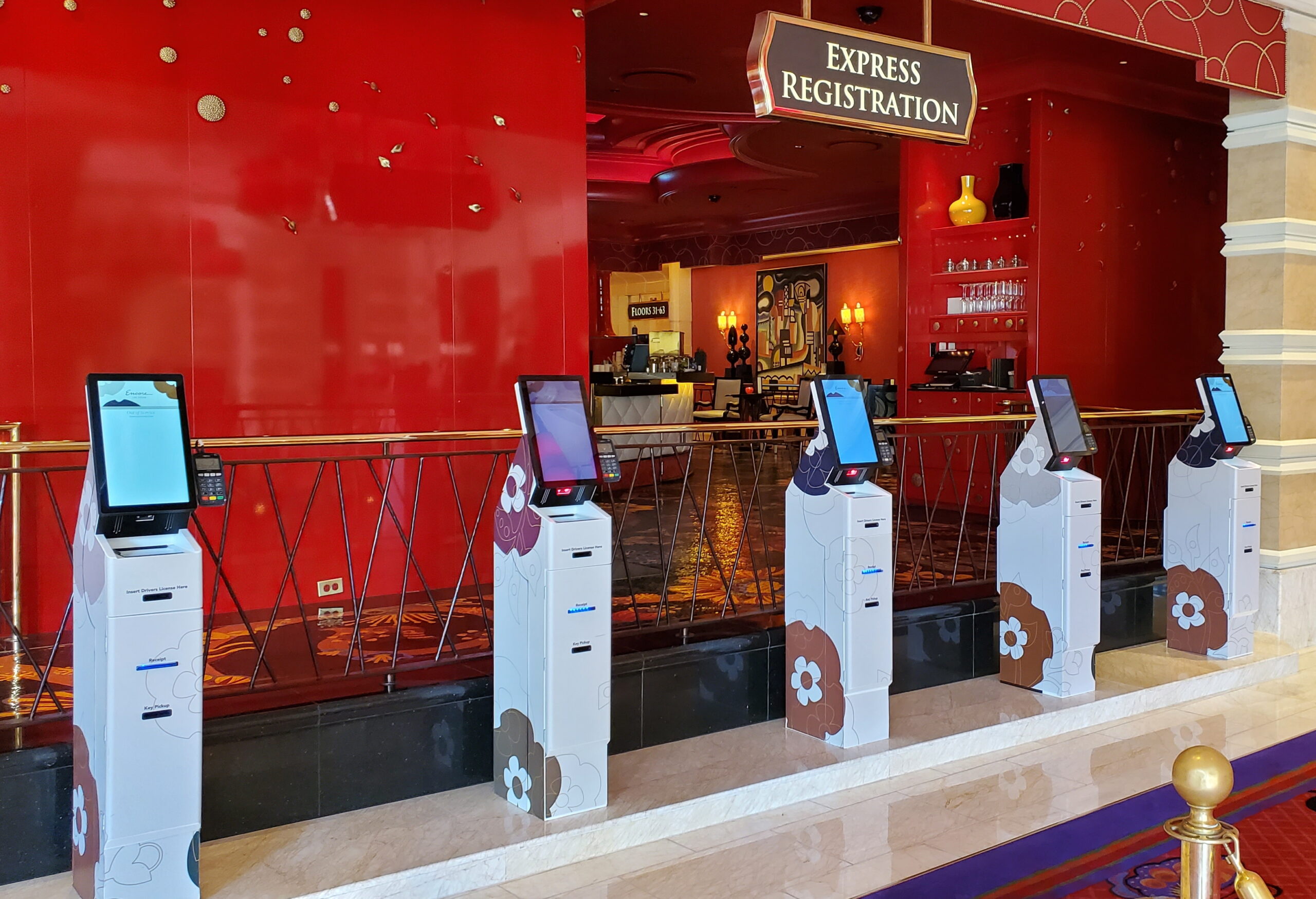
A hotel self-check-in kiosk should make arrival easier for guests. That means more than installing a touchscreen in the lobby. Guests need clear instructions, accessible hardware, reliable transactions, and a straightforward way to get help when they cannot complete check-in. For hotel technology and operations teams, the challenge is coordinating the physical kiosk, guest-facing software, and hotel systems. Reservation lookup, identification, payment, and room-key delivery must work together as one process. When evaluating hotel check-in kiosks, start with the guest’s journey from approaching the screen to receiving a working room key. Each step should help guests understand what to do next and whether their check-in has been completed successfully.
Guests may arrive tired, carrying luggage, or unfamiliar with the property. The kiosk should make it immediately clear where to begin, what information is needed, and how to request assistance.
Instructions on the screen should match the physical devices. If guests need to scan an ID, insert a payment card, or collect a room key, they should be able to identify the correct device without searching around the enclosure.
Evaluate the first interaction by asking:
Can guests recognize the kiosk as a check-in station?
Is the starting screen easy to understand?
Do instructions clearly identify where to scan, insert, or collect an item?
Can guests select an appropriate language?
Is help visible throughout the process?
Device placement is part of this experience. Custom kiosk design and engineering allows the enclosure to be developed around the selected hardware, guest workflow, and installation environment.
Self-service can help distribute arrival traffic, but a kiosk only improves the experience when guests can complete the required steps. A quick reservation lookup provides little benefit if payment fails or a room key cannot be issued. Before choosing hardware, map the complete check-in workflow with your software provider and operations team. Confirm how the system will retrieve reservations, check room readiness, handle payment authorization, and encode or dispense keys.
Oracle’s guidance on PMS and kiosk check-in integration illustrates how hotel systems, payment processing, and key generation contribute to this process. The functionality available at a particular property depends on its selected software, interfaces, and configuration. Test complete transactions before deployment, including unsuccessful ones. A missing reservation, declined payment, or unavailable room should lead to a clear explanation and an appropriate next step.
Late-night arrivals make dependable self-service especially valuable, but they also make support planning essential. Guests should know how to get help if the kiosk cannot complete their check-in. Define which situations require staff assistance. These may include reservation discrepancies, payment problems, unreadable identification, room changes, or unsuccessful key dispensing.
The kiosk should explain what happened without displaying confusing technical messages. It should then direct guests to the property’s available support channel, whether that is the front desk, an intercom, or another monitored service. Test the assistance process during the hours when staffing is lowest. Self-service should give guests another way to check in while keeping help available when they need it.
Hotel self-service kiosks can support passport or ID scanning when they include a suitable document reader and software that can use its output within the check-in workflow. Support depends on the selected scanner, the documents it can read, and its integration with the hotel’s systems.
When evaluating a configuration, confirm:
Which passports, driver’s licenses, and other identification documents it supports.
Whether it captures images, extracts document information, or performs document authentication.
How the captured information is used during registration.
What happens when a document is damaged, unsupported, or unreadable.
How guests are instructed to position their documents.
Scanning a document is not automatically the same as verifying the guest’s identity. Ask the solution provider to explain exactly which checks the proposed system performs. Manufacturers such as Thales provide passport and ID document readers. The appropriate device should be selected around the property’s requirements and tested with its intended software. Physical placement matters too. Guests should be able to reach the scanner, understand how to use it, and retrieve their documents comfortably.
An effective hotel kiosk must be usable within the space where it is installed. Evaluate the approach to the kiosk, clear floor space, screen position, and access to scanners, payment devices, and room-key outlets. Consider guests using mobility devices, travelers carrying bags, and families arriving together. The installation should allow guests to complete check-in without blocking circulation through the lobby. Accessibility also involves the software and the available assistance. Readable instructions, understandable prompts, and appropriate alternatives should be considered alongside the physical enclosure. The U.S. Access Board provides information on self-service kiosk accessibility. Hotel teams should evaluate the complete deployment with their accessibility specialists rather than treating the enclosure alone as proof of compliance.
Hotel check-in involves personal information, reservation details, and payment interactions. Privacy should be considered in both the kiosk’s physical layout and its software. Evaluate whether people waiting nearby can see the screen or observe sensitive information being entered. Screen orientation, spacing, and privacy accessories can help address exposure in a busy lobby.
The software should display only the information needed for the current task and clear guest information when a session ends or is abandoned. Document handling, data storage, and access permissions should also be reviewed with the relevant technology providers. Include privacy in deployment testing. Check what remains visible after a completed transaction, a cancelled session, or a guest walking away midway through check-in.
A hotel check-in kiosk depends on several components working together. Network interruptions, payment errors, printer issues, and depleted key-card supplies can interrupt the guest journey. Before deployment, test repeated transactions and recovery from common failures. Establish who will monitor the kiosks, replenish consumables, resolve faults, and escalate software or hardware problems.
Service access should be considered during hardware selection. Routine maintenance should be practical for the team responsible for keeping the kiosks operational. An existing enclosure may suit the intended application. When evaluating standard kiosk designs, confirm that the proposed configuration can accommodate the required peripherals, accessible interaction, and maintenance access. More specialized requirements may call for a custom design.
Before approving a hotel self-check-in deployment, confirm that your team can answer these questions:
Can guests complete the intended workflow from reservation lookup to room-key collection?
Have the required documents, payments, and key systems been tested together?
Are instructions clear and consistent with device placement?
Has the complete installation been evaluated for accessibility and privacy?
Can guests get help when a transaction cannot be completed?
Is there a clear plan for monitoring, replenishment, and maintenance?
The best configuration depends on the property’s software, operational requirements, and guest needs. Kiosk Innovations designs and manufactures hotel kiosk hardware around those requirements, with attention to peripheral placement, service access, and the physical guest interaction. Explore our hotel check-in kiosk capabilities to discuss the hardware requirements for your deployment.