
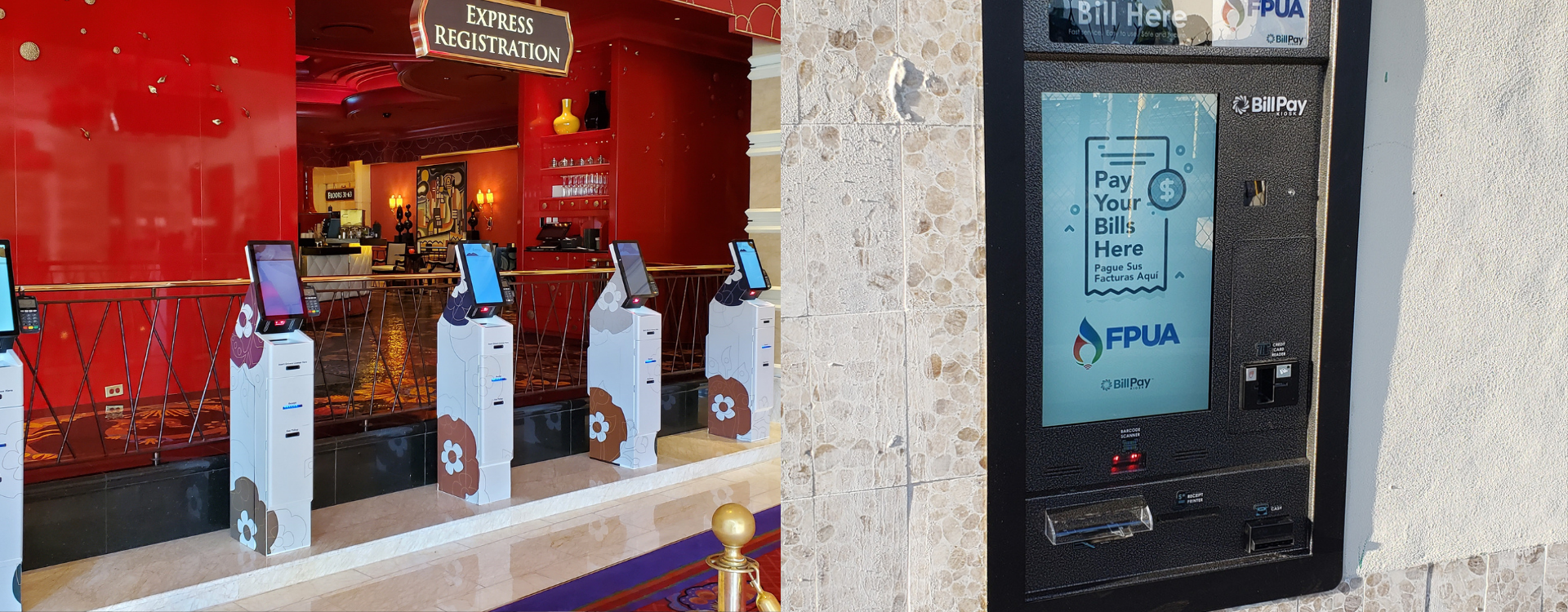
Depending on where a self-service kiosk deployment is installed has a major impact on how the kiosk should be designed from the start. An indoor kiosk placed in an environment like a hotel lobby, arcade, or hospital operates in a controlled setting in most cases. These kiosks don’t have to deal with climate changes like rain, snow, sunlight, bugs, or extreme temperature swings. Oppositely, an outdoor kiosk has to perform in conditions that are less predictable, it may be exposed to heat, cold, moisture, wind, dust, attempted theft, and daily public use without the same level of protection from the indoor environment.
A kiosk’s materials, design, internal components, temperature, screen visibility, and security requirements all vary depending on whether the kiosk is going indoors or outdoors. This is also why outdoor kiosks are usually more expensive than indoor kiosks. In many cases, an outdoor kiosk can cost two to three times more than a similar indoor unit because it requires stronger materials, outdoor-rated components, high-brightness displays, climate control, sealing, and added security protection. For potential buyers, this is important to understand early because the environment where the kiosk will be installed can directly affect the design, cost, and reliability of the deployment.
Indoor kiosks are designed for spaces where the building itself provides protection from weather and temperature complications. Due to this, the design of an indoor kiosk is usually centered around durability, appearance, usability, and ease of maintenance rather than environmental protection. A common material choice for an indoor kiosk deployment is cold-rolled steel, oftentimes referred to as CRS. Cold-rolled steel provides a strong and stable structure allowing the enclosure to be formed into a clean, professional design. After fabrication, the steel is commonly powder coated which gives the kiosk a durable surface that holds up well in high-traffic environments.
These kiosks work well for applications such as hotel check-in, loyalty and rewards programs, healthcare registration, bill payment, and other self-service applications where the kiosk is located inside a controlled facility. Even though indoor kiosks are not exposed to the same environmental risks as outdoor units, they still need to be built with dependable components, secure access panels, organized internal layouts, and with customer experience in mind.
When an indoor location is available, many businesses will prefer that option because it reduces the cost and complexity of the deployment. Indoor kiosks do not usually require the same level of climate control, water protection, corrosion resistance, or sunlight-readable displays as outdoor units. However, indoor placement is not always possible. Some businesses need a kiosk to be available outside of normal operating hours, while others may not have an indoor location that is accessible to customers. In those situations, an outdoor kiosk may be the better option, but it requires a more involved design process.
An outdoor kiosk design also changes depending on the actual location. For example, kiosks placed near coastal areas may have to deal with salt in the air, which can speed up corrosion on metal components, fasteners, connectors, and internal hardware. In those environments, material selection, protective coatings, and corrosion-resistant hardware become even more important. For outdoor kiosk deployments the enclosure is the first line of defense for the entire system. The structure has to protect the screen, computer, wires, payment devices, printers, and other internal hardware from environmental exposure while still remaining usable and accessible to the customer.
For this reason, outdoor kiosks are often built with stainless steel or aluminum materials that are better suited for long-term exposure. Stainless steel makes it durable and helps protect the kiosk from moisture, rust, and harsh outdoor conditions. For outdoor areas where the kiosk may be exposed to rain, snow, road salt, humidity, or frequent temperature changes, this is very important. Protection against weather is normally the biggest difference between an indoor and outdoor kiosk. Outdoor kiosks need proper gasketing around doors, panels, seams, locks, and access points to help reduce the risk of water intrusion.
Even small openings can create problems when a kiosk is exposed to rain, wind, or moisture. If water enters the kiosk it can affect electrical components, displays, printers or the reliability of the system. Environmental exposure can also come from more than just rain. Outdoor kiosks may be exposed to wind-blown dust, sprinkler systems, cleaning operations, insects, rodents, leaves, and small debris. Openings on the hardware that don’t normally create issues indoors can become entry points for these problems when the kiosk is placed outside. A properly designed outdoor kiosk should include protected ventilation, sealed access areas, and construction details that help keep unwanted materials away from internal components.
Outdoor kiosks have to manage internal temperature in a way indoor kiosks usually do not. Inside a building, the surrounding environment is already controlled by heating and air conditioning. Whereas outside, the kiosk has to protect its own internal components from heat, cold, and direct sunlight. Oftentimes this is why outdoor kiosks include insulation, heating, cooling, or ventilation systems. These features help keep the inside of the kiosk at a more stable temperature so the screen, computer, printer, payment devices, and other electronics can operate properly. In hot weather, cooling or ventilation helps prevent the cabinet from overheating. In cold weather, heaters help protect components from freezing temperatures and reduce issues that can happen when electronics are exposed to extreme cold.
Temperature control can also help with humidity. In humid environments such as Florida, Texas, Louisiana, or coastal regions, air conditioning helps reduce moisture inside the kiosk. This can improve the reliability of card dispensers, ticket printers, receipt printers, electronics, and connectors. Lower humidity can also help reduce media jams, condensation, and other problems that affect long-term performance.
The components inside an outdoor kiosk need to be chosen for the direct environment. Outdoor rated or OEM rated parts are very important because they are designed to handle tougher conditions than standard indoor components. When the kiosk is properly insulated, temperature controlled, and built with the right hardware, it’s more likely to perform reliably throughout different seasons. Without the proper climate control, an outdoor kiosk deployment can run into problems such as overheated electronics, slow or failed screens, printer issues, condensation, or shortened component life. A strong outdoor kiosk design accounts for these risks before the unit is installed rather than trying to fix them after problems start happening.
Kiosk screen visibility is another area where indoor and outdoor kiosks can differ. An indoor kiosk is usually in a space where the lighting is controlled, making it easier to manage brightness, glare and readability. Outdoor displays have to remain usable in difficult lighting conditions, including direct sunlight, shadows, glare, cloud cover and nighttime use. The display must be bright enough and positioned properly so users can read instructions, complete transactions, and move through the workflow without complications.
This is why outdoor kiosks often require high-brightness, sunlight-readable displays. These screens are usually much brighter than standard indoor displays and can be a major reason outdoor kiosks cost more than indoor units. Depending on the environment, outdoor displays may need to be in the range of 1,500 to 2,500 nits or more so the screen remains readable in direct sunlight.
The use of high brightness screens, anti-glare considerations, protective glass, and a good enclosure design can all play a role in improving outdoor usability. Some outdoor kiosk deployments may also include a canopy, sunshield, or overhead cover. These features can reduce direct sunlight, help with screen readability, protect the customer from rain or snow, and reduce some of the heat that builds up around the kiosk. If the screen is difficult to see, users may abandon the transaction, ask staff for help, or avoid the kiosk altogether. In outdoor environments, screen visibility is not just a design preference, it can directly affect the success of the kiosk deployment.
Security is important for any kiosk but outdoor units often require a stronger approach because they are installed in more exposed areas. An indoor kiosk may be monitored by staff, cameras, or building security whereas an outdoor kiosk is accessible after hours, located in a parking lot or used in a public setting with less supervision. Due to this, outdoor kiosks need stronger theft protection and tamper-resistent design features like reinforced access doors, locking systems, protected payment devices, mounting brackets, and durable enclosure construction. These all can help reduce the risk of unauthorized access or damage. Evidently, the goal is not only to protect the kiosk but also to protect the transaction hardware and internal systems that keep the unit operational.
The main difference between indoor and outdoor kiosks is not where they are placed, it’s what the kiosk must be built to withstand a certain environment. Indoor kiosks are designed for controlled environments where durability, aesthetics, usability, and maintenance access are primary concerns. Outdoor kiosks require a more rugged build that accounts for weather, water intrusion, pests, climate control, readability, corrosion resistance, and theft protection. For businesses planning a kiosk deployment, this distinction matters early in the buying process.
If a kiosk can be placed indoors and still meet the needs of the business, that is often the simpler and more cost-effective option. If the kiosk needs to be available outside normal business hours, placed in a parking lot, installed near a building exterior, or used in an environment where customers need access without going inside, then an outdoor kiosk may be necessary. In that case, the kiosk needs to be designed with the right materials, components, climate control, screen brightness, sealing, and security features from the start.